
How to Install a GPS Tracker in Your Car, Step by Step
Quick Summary
The right GPS tracker depends on what you need it to do and how the vehicle is used. The four common types are OBD-II, hardwired, battery-powered, and magnetic, and each trades installation effort against power, stealth, and reliability. Most OBD-II units take about five minutes to install.
- OBD-II trackers plug into the diagnostic port and draw power from the car.
- Hardwired trackers are harder to remove and can run for years without charging.
- Battery-powered trackers need no wiring but must be recharged periodically.
- Never splice into airbag wires, which are yellow or have a yellow sheath.
- Test the installation with a short drive and check that the app shows location updates.
Table of Contents
- Choosing the Right GPS Tracker for Your Car and Use Case
- Tools, Materials and Preparing Your Vehicle
- Safety First: Turning Off the Ignition and Disconnecting the Battery
- Installing an OBD-II GPS Tracker Step by Step
- Wiring a Hardwired GPS Tracker and Avoiding Airbag and Fuse Problems
- How to Connect GPS Tracker to Mobile Phone and Test the Installation
- Troubleshooting, Battery Drain and Your Next Step With HB Auto Sound OC
- Frequently Asked Questions
Choosing the Right GPS Tracker for Your Car and Use Case
Choosing the right GPS tracker starts with one question: what do you need it to do? Some owners want a simple location check. Others want engine alerts, geofencing, or a device that stays hidden.
A daily commuter, a work truck, and a weekend classic car all need different things, so the right tracker depends on how the vehicle is actually used.
OBD-II, Hardwired, Battery-Powered and Magnetic Trackers Compared
There are four common types of GPS tracker for cars. Each one trades ease of install against power, stealth, and reliability.
- OBD-II trackers plug into the diagnostic port under the dashboard. They take about five minutes to install and draw power from the car. The downside is that the port is easy to find, so a thief may unplug the device.
- Hardwired trackers connect directly to the vehicle's electrical system. They are harder to remove and can run for years without charging. They require careful wiring, which is why many owners choose professional installation.
- Battery-powered trackers need no wiring at all. They are the easiest to hide and move between vehicles. The trade-off is that you must recharge them, and reporting frequency affects how long they last.
The four common GPS tracker types differ in installation effort, power source, stealth, and reliability, as summarized below.
| Tracker type | Installation | Key trade-off |
|---|---|---|
| OBD-II | About five minutes | Port is easy to find and unplug |
| Hardwired | Careful wiring, often professional | Hard to remove, runs for years without charging |
| Battery-powered | No wiring needed | Must be recharged; reporting frequency affects life |
| Magnetic | Quick to place and remove | Can fall off or lose signal if antenna is blocked |
Tools, Materials and Preparing Your Vehicle
Gather everything before you start. A hardwired install can stall halfway through if you are missing a fuse tap or crimp connector.
Most installs need:
- The GPS tracker and its included harness or cable
- A plastic trim tool and a small socket set
- A digital multimeter to confirm power and ground
- Wire strippers, crimpers, and heat-shrink tubing
Park on a flat, level surface with the parking brake set. Read the tracker manual for the mounting and wiring diagram specific to your model. Set aside 30 to 90 minutes, depending on the type you chose.
Safety First: Turning Off the Ignition and Disconnecting the Battery
Electrical work can damage your car's computers or cause a short. Take a few minutes to protect yourself and the vehicle.
- Turn the ignition off and remove the key or fob from the cabin.
- Close all doors and wait a few minutes so the modules go to sleep.
- For hardwired installs, disconnect the negative battery terminal with a wrench. Tuck the cable away from the post.
- Wait at least 10 minutes before touching any wiring, since some modules keep a charge.
Many owners skip the battery step for OBD-II installs. That is usually safe, but disconnecting the battery is still the cautious choice if you plan to work near the fuse box.
Installing an OBD-II GPS Tracker Step by Step
OBD-II is generally the fastest install, and it is a good first project for many owners.
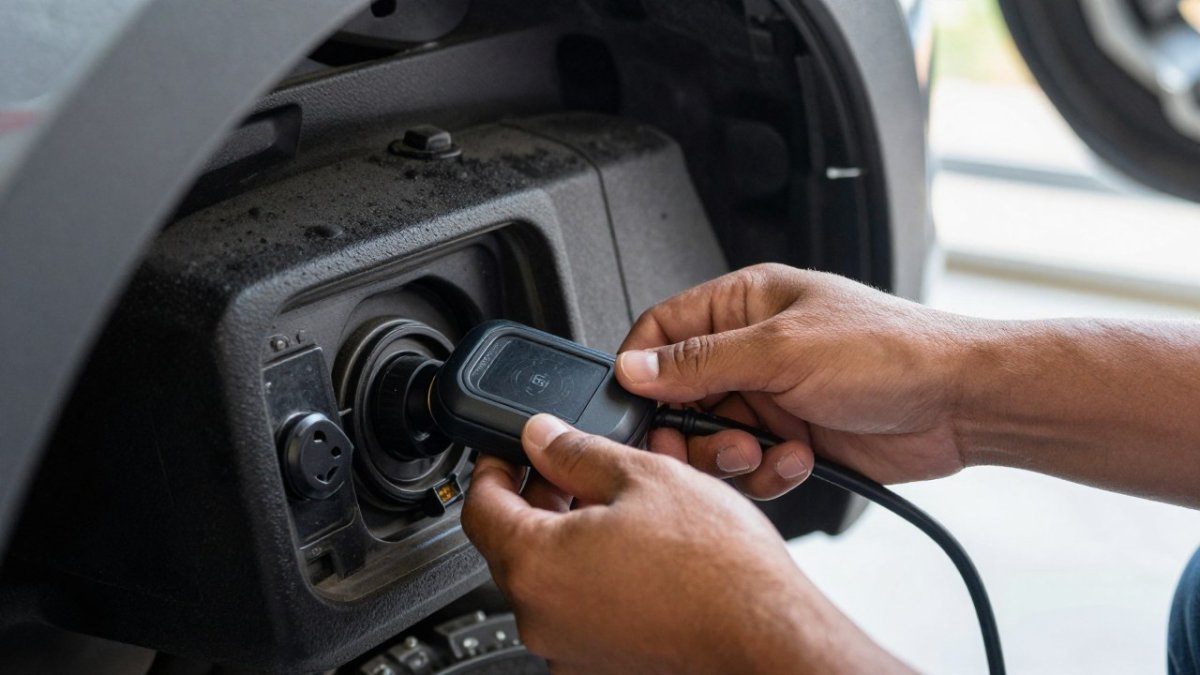
- Find the OBD-II port. It is usually under the driver's side dashboard, within about 18 inches of the steering column, but the exact spot varies. Common locations include under the lower dash panel, behind a small removable cover, inside the center console, or near the hood release. Look for the 16-pin trapezoid connector (two rows of eight pins). If you cannot find it, check the owner's manual, the port location is listed there for most models.
- Confirm the port is powered and note the pin behavior. Turn the ignition to accessory mode and check pins 16 (battery positive) and 4/5 (ground) with your multimeter. Then turn the ignition off and recheck pin 16. Some vehicles keep the port live at all times; others switch it with the ignition. This matters because a tracker left on a constant-power port can drain the battery over a week of sitting.
- Check clearance before plugging in. Some ports sit recessed behind trim, and a tracker with a straight connector can bottom out against the panel. A short OBD-II extension cable (often 12 to 36 inches) lets you relocate the device behind the dash while keeping the port accessible for service.
- Plug in the tracker. Push the connector in firmly until it clicks or sits flush. Do not force it, the keyed shape only fits one way.
- Secure the device. Tuck it behind a trim panel or under the dash so it does not rattle, block your pedals, or interfere with the dead pedal. Use a zip tie or adhesive pad rather than leaving it hanging by the connector.
- Start the car and check for power. The tracker's status light should turn on within a minute. If it does not, recheck the connection and the fuse that protects the OBD-II circuit.
Vehicle-specific notes: On hybrid and electric vehicles, confirm the tracker's standby draw against the vehicle's OBD-II fuse rating before installing.
!A technician's hands plugging a small GPS tracker into the OBD-II port under a car dashboard in a well-lit garage
A loose tracker can work its way out of the port over time, and tracking can stop without warning.
Wiring a Hardwired GPS Tracker and Avoiding Airbag and Fuse Problems
Hardwired trackers offer the most protection, but the wiring needs care. Two areas cause most of the trouble: airbag circuits and fuses.
Airbag precautions: Never splice into wires running to the airbag module, clock spring, or steering wheel. Wiring near the steering column can also affect controls on the wheel, so see how steering wheel controls work with an aftermarket stereo before you start.
Fuse selection: Use a fuse tap on a circuit that switches with the ignition, so the tracker does not drain the battery when the car sits.
Ground wire: Connect the black ground wire to bare metal on the chassis. Scrape away paint if needed.
Once the wiring is done, reconnect the battery and confirm the tracker powers on.
How to Connect GPS Tracker to Mobile Phone and Test the Installation
Most trackers pair with a phone app, and setup typically takes a short time once the device has power.
- Download the manufacturer's app from the App Store or Google Play.
- Create an account and register the device using its IMEI number, printed on the label or shown in the app.
- Activate the SIM or confirm the cellular plan is live.
- Set your reporting interval. Shorter intervals give better tracking but use more battery.
- Set up alerts for ignition on, movement, or leaving a geofenced area.
Testing the installation:
- Walk or drive a short loop and watch for location updates on the app.
- Check the signal strength indicator. Weak signal often means the antenna is blocked by metal.
- Turn the car off and confirm the tracker still reports, or that battery-powered units show the correct status.
A second test the next day can help, since intermittent faults sometimes only appear after the car has sat overnight.
Troubleshooting, Battery Drain and Your Next Step With HB Auto Sound OC
Most installation problems fall into four buckets: power, signal, reporting, and battery drain. Work through them in that order, each one rules out the next.
Post-install verification checklist
Run this the same day, then again after the car has sat overnight. Intermittent faults often only appear after a cold start.
- GPS fix: The app should show a location within a few minutes of power-up outdoors. If it shows the last known location or a wide accuracy circle, the antenna is blocked or the device has not yet acquired satellites.
- Cellular connection: Confirm the signal bars or status field in the app. A device with GPS but no cellular link will store points locally and upload them late, which looks like lag in the app.
- Reporting interval: Check that the device is reporting at the interval you set. A tracker set to 30 seconds but reporting every 10 minutes is usually on a power-saving profile or has a weak cellular link.
- Ignition detection: Turn the car on and off and confirm the app logs an ignition event. If it does not, the tracker is on a constant-power circuit and cannot tell when the engine is running.
Diagnosing common problems
- No power: Check the fuse protecting the circuit, the ground connection, and whether the circuit is live with the ignition on. On OBD-II installs, confirm the port itself is powered with a multimeter before blaming the tracker.
- No location updates: Move the device to a spot with a clearer sky view. Metal, tinted glass with metallic film, and dense wiring bundles all attenuate GPS. Confirm the SIM plan is active and has data remaining, a lapsed plan looks identical to a dead device in the app.
- Battery drain: A hardwired tracker on a healthy battery should not drain it. If the car is slow to crank after a few days, the tracker is probably on a constant-power circuit. Move it to an ignition-switched fuse, or choose a tracker with a sleep mode that drops to low-power reporting when the ignition is off.
- Random dropouts: Re-check the ground and the OBD-II connector. A ground that is tight but painted will pass a quick test and fail in heat or vibration.
Power consumption and long-term reliability
Battery drain is the most common long-term complaint, and it is almost always a placement or profile issue rather than a defective device.
Some installs are simple, and others need a careful hand. You can book a professional installation or contact the shop for help choosing the right device.
If you want to keep factory features working while you add electronics, our car subwoofer guide explains how aftermarket upgrades fit into an existing system. And if you are weighing security options together, our truck alarm guide covers what to look for.
Ready to protect your vehicle with a tracker installed the right way?
Frequently Asked Questions
Can I install a GPS tracker in my car myself?
Yes, most owners can install an OBD-II or battery-powered GPS tracker themselves in under an hour with basic hand tools. Hardwired installs take more time and involve the vehicle's electrical system, fuses and sometimes airbag wiring, so many owners choose a professional for those. Whichever method you pick, confirm the device powers on, reports its location in your app and stays secured in its mounting spot before you drive the car normally again. If you are unsure about the wiring, a professional installer can finish the job correctly.
Can a GPS tracker drain a car battery?
A properly installed tracker can drain a battery if it is hardwired without an ignition-switched feed or if it reports location too frequently. Battery-powered trackers never draw from the car, but they need recharging. Choose a tracker with a sleep or motion-activated mode, and check your battery voltage after a few days of parking. Most drain problems come from a wiring mistake or an overly aggressive reporting interval, both of which you can correct.
Is it legal to put a GPS tracker on someone else's car?
Rules vary by state, and tracking a vehicle you do not own, or one owned by someone else without consent, can raise privacy and legal concerns. Install a tracker only on a vehicle you own or control, such as a family or company car where the owner has agreed. Check your state's rules before installing one on any other vehicle, and keep records of consent when a car is shared or leased.
Can a GPS tracker work without a monthly subscription?
Many trackers can run without a monthly plan for basic location lookups, but real-time tracking, alerts and history usually depend on a cellular data plan. Some devices offer a one-time purchase with limited service, while others require ongoing fees. Read the service terms before buying, confirm what features remain without a plan, and ask an installer which models match your needs.

Ready to Upgrade Your Ride?
Call us at (714) 842-1250 or visit us at 16732 Beach Blvd Ste A, Huntington Beach.
Get a Free Quote